axis vMerchant
axis vMerchant eCommerce White Papers
11. QR Codes
11.1 What Is a QR Code?
QR stands for Quick Response and is a type of two-dimensional barcode designed to store information that can be read quickly by a digital device, most commonly a smartphone camera. Unlike traditional barcodes, which store data in one direction, QR codes store data both horizontally and vertically, allowing them to hold much more information.
A single QR code can contain:
- Website URLs
- Text or messages
- Contact details (vCards)
- Wi-Fi network credentials
- Payment or app download links

The most common use of a QR code is to provide a link to a page on your website and, since they simply encode a URL, you can generate a QR code for any page on your site and use that in external marketing materials, such as magazine adverts or flyers handed out at an exhibition.
11.2 Creating a QR Code
There are numerous online tools for creating QR codes as well as functions within commercial graphic design applications (for example, Adobe provide a QR Code generator). An Internet search for “free qr code generator” will produce many options to choose from.
Whichever tool you use, you simply provide the URL that you want the QR code to link to.
For example, on your website, find an existing link to the page to which you want to direct visitors, right-click and choose Copy Link Address:
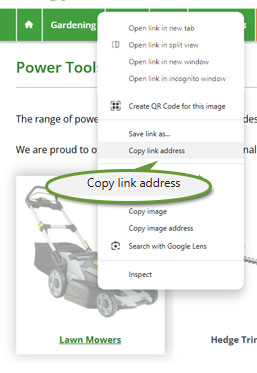
Alternatively, you can go to the page itself and copy the address from the browser's address bar.
Whichever method you choose, you can paste the URL into the QR generator of your choice:
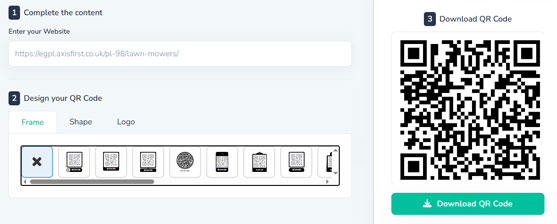
You can test the result by scanning the QR Code directly off of the screen with your mobile phone.
The generated QR code can then be used in your printed or digital marketing to direct visitors to that web page:

11.3 Linking to Isolated Information Pages
In addition to using QR codes in marketing materials (to simply save the visitor from having to type in a long web address), you can also create web pages that have no external links in your site's navigation and use the QR code as the primary way of reaching those pages.
For example, you could create stand-alone information pages that contain detailed product information (such as manual downloads or setup guides) that is inappropriate to include on the main product page. Those information pages could then be accessed via a QR code, for example on literature shipped with the product or on its packaging.
As an example, using axis vMerchant Express, you can create a self-contained information page using the CMS system. Further information is in the axis vMerchant Express Administrators Guide Content Management section.
An axis vMerchant Express site will have a predefined section for bespoke pages. You can either create a page within this section or, if you will have many instances, you could choose to create subsidiary series to make administration easier in the future:
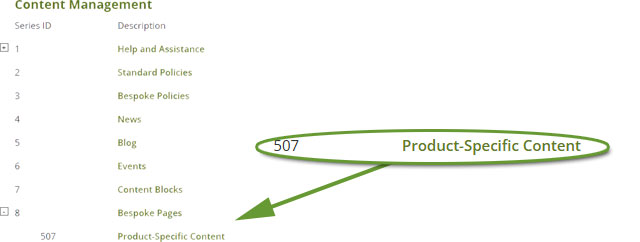
Each information page can then be created within that series:
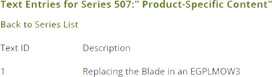
The page can then be accessed using a specific URL, as described in the axis vMerchant Express Administrators Guide.
In the example above, this will be https://egpl.axisfirst.co.uk/is-507-1/replacing-the-blade-in-an-egplmow3/
You can then go to the page on your website manually and copy-and-paste the website address into your chosen QR Code generator as described above. The resultant QR code can then be included with the product: